How to Set Up an Interval Timer for Any Workout
If you have ever rushed through rest periods or lost count of rounds mid-workout, you already know why learning how to set up an interval timer for workouts matters. A properly configured timer keeps your training structured, your intensity honest, and your results on track.
Whether you train with HIIT, Tabata, EMOM, or simple circuit formats, the right interval timer settings can turn a chaotic session into a focused, repeatable program. In this guide, you will learn exactly how to configure your timer for every popular workout style — step by step.
What Is an Interval Timer and Why Do You Need One?
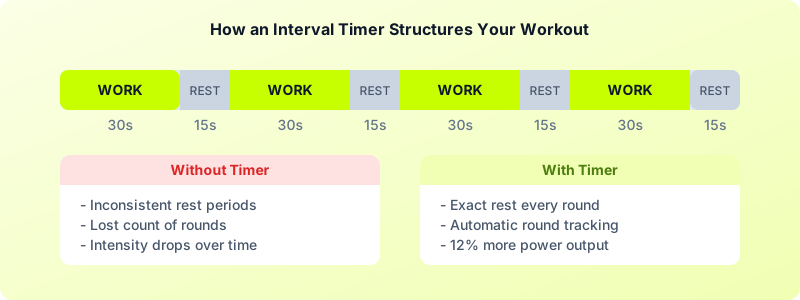
An interval timer alternates between work periods and rest periods automatically. You press start once, and the timer cycles through each phase — beeping, vibrating, or flashing when it is time to switch. Think of it as an automated coach that keeps your workout on schedule without you needing to watch the clock.
Without a timer, most people either cut rest periods short (hurting recovery) or let them drag on (killing intensity). Research from the Journal of Strength and Conditioning found that athletes who used timed rest intervals maintained 12% more power output across sets compared to those who rested "by feel."
This applies whether you are doing 20-second Tabata bursts or 3-minute boxing rounds. The moment you stop guessing your rest periods, your training quality jumps.
Here is what a structured interval timer gives you:
- Consistent intensity — You work hard for a set duration, then recover for a set duration. No guessing.
- Accurate tracking — You know exactly how long your workout took and how many rounds you completed.
- Hands-free training — Audio or haptic alerts mean you never need to stare at a clock.
- Progressive overload — You can shorten rest or extend work periods week by week.
How to Set Up Your Interval Timer Step by Step
Setting up a custom interval timer takes under 60 seconds once you know the four core settings. Here is your workout timer setup checklist:
1. Choose your work duration. This is the active phase — the time you spend exercising at high effort. Common choices range from 20 seconds (Tabata) to 3 minutes (boxing rounds).
2. Choose your rest duration. This is your recovery window between work intervals. Beginners typically need a 1:2 or 1:3 work-to-rest ratio. Advanced athletes might use 1:1 or even 2:1.
3. Set the number of rounds. How many work-rest cycles make up your session? A typical HIIT workout runs 8-12 rounds. A boxing session might use 6-10 three-minute rounds.
4. Add warm-up and cool-down periods (optional). Many timers let you add a countdown before the first round and a cool-down alert at the end. A 5-10 second countdown gives you time to get into position.
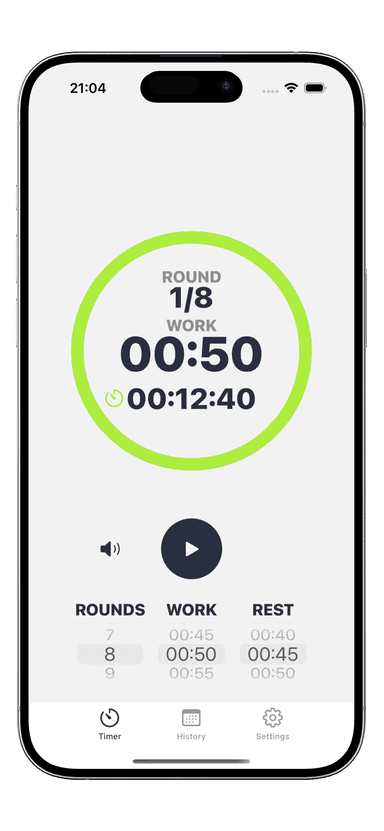
With Interval Timer, you can configure all four settings in a few taps, save your custom timer, and reuse it for every session. The app also supports multiple interval phases — so you can program complex workouts with different work and rest durations in a single timer.
Quick example: Say you want a 15-minute HIIT workout with 30 seconds of work and 15 seconds of rest. Open your timer, set work to 30 seconds, rest to 15 seconds, and rounds to 20. Hit start, and the app handles every transition for you. Total workout: exactly 15 minutes, zero guesswork.
Best Interval Timer Settings for Popular Workouts
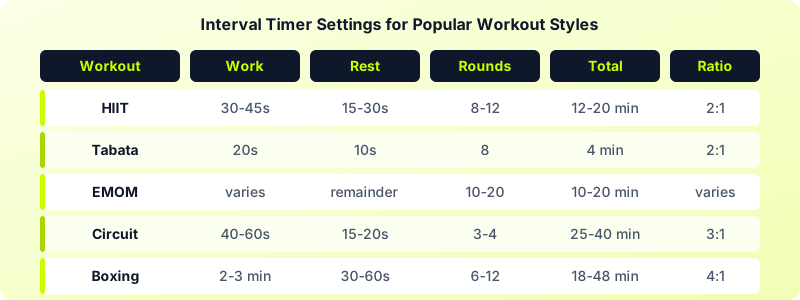
Not sure which interval timer settings to use? Here are the proven configurations for the most popular training styles:
HIIT (High-Intensity Interval Training)
- Work: 30-45 seconds
- Rest: 15-30 seconds
- Rounds: 8-12
- Total time: 12-20 minutes
Tabata Protocol
- Work: 20 seconds
- Rest: 10 seconds
- Rounds: 8 (one set = 4 minutes)
- Total time: 4-16 minutes (1-4 sets)
EMOM (Every Minute on the Minute)
- Work: complete reps within 60 seconds
- Rest: remaining time in the minute
- Rounds: 10-20
- Total time: 10-20 minutes
Circuit Training
- Work: 40-60 seconds per exercise
- Rest: 15-20 seconds between exercises, 60-90 seconds between circuits
- Rounds: 3-4 circuits of 5-8 exercises
- Total time: 25-40 minutes
Boxing Rounds
- Work: 2-3 minutes
- Rest: 30-60 seconds
- Rounds: 6-12
- Total time: 18-48 minutes
Common Timer Setup Mistakes to Avoid
Even experienced athletes make these timer setup errors. Here is how to fix them:
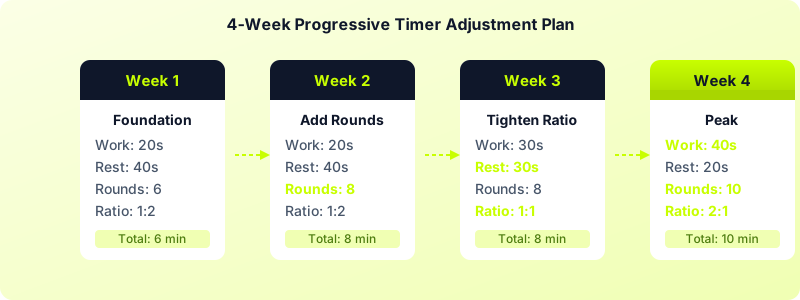
Starting too aggressive with work-to-rest ratios. If you are new to interval training, begin with more rest than you think you need. A 1:3 ratio (20 seconds work, 60 seconds rest) lets you maintain form and build a base. You can tighten the ratio over weeks as your conditioning improves.
Ignoring transition time. If your workout involves switching between exercises (like moving from burpees to kettlebell swings), you need a few seconds of transition built into your rest period. Add 5-10 extra seconds to your rest intervals for equipment changes.
Setting too many rounds. Quality beats quantity. Eight rounds at maximum effort produce better results than 20 rounds at 60% intensity. Start with fewer rounds and add one per week.
Skipping the warm-up countdown. Jumping straight into max-effort intervals without a warm-up countdown invites injury. Set a 10-second prepare phase before Round 1, and spend 3-5 minutes warming up before you even start the timer.
Using the same settings forever. Your body adapts. Every 3-4 weeks, adjust one variable: add a round, shorten rest by 5 seconds, or extend work by 10 seconds. Progressive overload applies to interval training just like it does to lifting weights.
Not matching the timer to your fitness level. A beginner jumping into 40 seconds of work with 10 seconds of rest will burn out in two rounds. Start conservatively. You can always make the timer harder next week — you cannot undo an injury from pushing too hard on day one.
Tips for Getting the Most Out of Your Workout Timer
Once your custom interval timer is configured, these strategies will help you squeeze maximum results from every session:
-
Use audio and haptic alerts together. In a noisy gym, you might miss a beep. Vibration alerts on your Apple Watch ensure you never miss a transition — even with headphones blasting music.
-
Save your favorite timer presets. Instead of rebuilding your timer every session, save 3-5 presets for your go-to workouts. Interval Timer lets you name and organize saved timers so you can start any workout in two taps.
-
Track your history. Logging which timer settings you used — and how you felt — helps you make smarter adjustments over time. Look for patterns: did you fade in the last 3 rounds? Maybe you need 5 more seconds of rest.
-
Pair your timer with music. Listening to music during timed intervals has been shown to increase work output by up to 15%. Interval Timer supports background music playback so your playlist keeps going while the timer guides your pace.
-
Start your timer on your wrist. If you train in a home gym or outdoors, controlling your timer from an Apple Watch means you do not need your phone nearby. Just glance at your wrist for the countdown and feel the tap when it is time to switch.
-
Use the prepare countdown. Give yourself 10 seconds before Round 1 to get into position, take a deep breath, and mentally commit to the first work interval. Those 10 seconds set the tone for the entire session.
-
Review your workout history weekly. At the end of each week, look back at your timer settings and how each session felt. If you completed every round with energy to spare, it is time to progress. If you consistently failed on the last two rounds, scale back slightly and build up.
Start Training Smarter Today
Knowing how to set up an interval timer for workouts is the difference between winging it and following a real program. Pick a workout style from the settings table above, configure your timer, and commit to consistent, structured training.
Download Interval Timer and set up your first custom workout timer in under 60 seconds — then let the app handle the counting while you focus on the work.