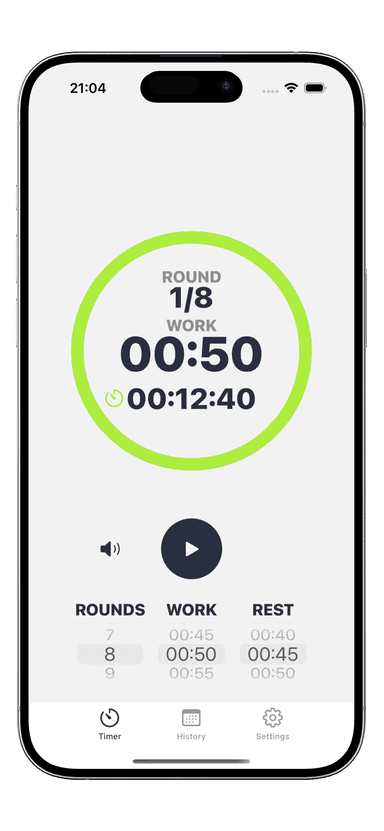
How to Set Up an Interval Timer for Any Workout
You picked a workout, you cleared space in your living room, and you are ready to train. But then you open your timer app and stare at a wall of settings: rounds, work, rest, prep time, sets. Knowing how to set up an interval timer correctly is the difference between a focused, effective session and five minutes of confused button-tapping before you even break a sweat.
The good news? Once you understand the core settings, you can configure a timer for any workout format in under 30 seconds. This guide walks you through every step — from your first basic setup to advanced features that sharpen your training.
Why You Need an Interval Timer for Training
Training without a timer is like driving without a speedometer. You might get somewhere, but you have no idea if you are going fast enough. An interval timer removes the guesswork from your workout by enforcing precise work and rest periods.
Here is what structured timing does for your results:
- Keeps intensity honest — Without a timer, a "30-second sprint" often becomes 20 seconds. A timer holds you accountable to the full interval.
- Prevents over-resting — Research shows most people rest 40-60% longer than intended when they rely on feel. A timer keeps recovery periods tight.
- Tracks total volume — When your timer counts rounds, you know exactly how much work you completed. That data drives progress.
- Enables progressive overload — Add 5 seconds of work or cut 5 seconds of rest each week. Small, measurable changes stack into major fitness gains over months.
Whether you follow a HIIT workout guide, run Tabata exercises, or train EMOM workouts, a properly configured timer is your most important training tool.
Step-by-Step: Setting Up Your First Interval Timer
Every interval timer setup follows the same basic flow. Once you learn these four steps, you can configure any workout format in seconds.
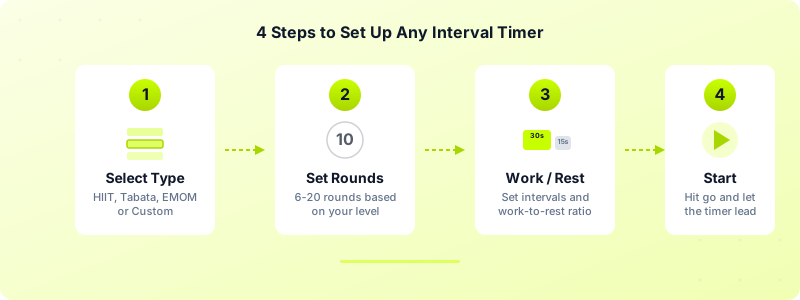
Step 1: Choose Your Workout Type
Start by selecting the format that matches your training plan. Most timer apps — including Interval Timer — offer presets for HIIT, Tabata, EMOM, AMRAP, and custom intervals. Choosing a preset loads sensible default values so you are not starting from zero.
If your workout does not match a preset, select "Custom" and build your own intervals from scratch.
Step 2: Set Your Rounds
Rounds determine how many times you repeat the work-rest cycle. Beginners typically start with 6-8 rounds, while advanced athletes may run 12-20 rounds depending on the format.
A quick rule of thumb: take your target workout duration, divide by the length of one full cycle (work + rest), and that gives you your round count. For a 20-minute session with 40-second work and 20-second rest intervals, you need 20 rounds.
Step 3: Configure Work and Rest Intervals
This is where the real customization happens. Your work interval is the time you spend exercising at high intensity. Your rest interval is your recovery period between efforts.
The ratio between work and rest depends on your goal:
- Fat loss and conditioning — 1:1 ratio (e.g., 30s work / 30s rest)
- Power and speed — 1:3 ratio (e.g., 15s work / 45s rest)
- Endurance — 2:1 ratio (e.g., 40s work / 20s rest)
Step 4: Set Prep Time and Start
Prep time (also called countdown or get-ready time) gives you 5-10 seconds before the first work interval begins. Use this to get into position and mentally prepare. Then hit start and let the timer drive your session.
Timer Settings for Popular Workout Types
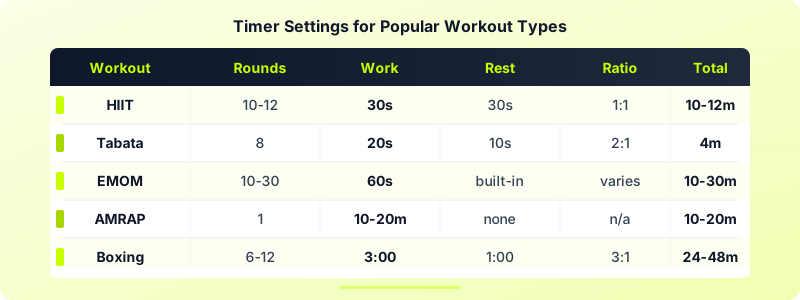
Different workout formats require different timer configurations. Here is a quick-reference breakdown of the most popular formats and their exact settings.
HIIT (High-Intensity Interval Training)
HIIT is the most flexible format. A standard beginner HIIT setup uses 30 seconds of work followed by 30 seconds of rest for 10-12 rounds. That gives you a 10-12 minute session. As you get stronger, shift to a 2:1 ratio — 40 seconds work, 20 seconds rest — to increase the challenge.
Tabata
Tabata follows a strict protocol developed by Dr. Izumi Tabata: 20 seconds of all-out effort followed by 10 seconds of rest, repeated for 8 rounds. Total workout time is exactly 4 minutes. Configure your timer with these exact values — there is no room for variation in a true Tabata set.
EMOM (Every Minute On the Minute)
EMOM timers work differently. Set your timer to repeat a 60-second interval for 10-30 minutes. You perform your prescribed reps at the start of each minute and rest for whatever time remains. The faster you finish, the more rest you earn.
AMRAP (As Many Rounds As Possible)
AMRAP uses a single countdown timer — typically 10-20 minutes — with no built-in rest intervals. Set one long work interval and zero rest. Your goal is to complete as many rounds of a prescribed circuit as possible before time expires.
Boxing Rounds
Traditional boxing rounds are 3 minutes of work with 1 minute of rest. Set your timer to 3:00 work / 1:00 rest for 6-12 rounds. Beginners can start with 2-minute rounds and work up.
Advanced Timer Features That Improve Your Training
Once you have mastered the basic interval timer setup, explore these features to get more from every session.
Warm-up and cooldown timers — Add a dedicated 3-5 minute warm-up interval before your first working round. This prevents the common mistake of jumping straight into high-intensity work with cold muscles.
Sound and vibration alerts — Customize which sounds play at the start and end of each interval. Interval Timer supports both audio cues and haptic vibration on Apple Watch, so you can train without staring at your screen.
Half-time warnings — Enable a mid-interval alert that plays halfway through your work period. This is especially useful for longer intervals (45-60 seconds) where pacing matters.
Set grouping — Some workouts alternate between different exercises with different work intervals. Advanced timers let you group intervals into sets — for example, 3 rounds of 40s work / 20s rest followed by 3 rounds of 20s work / 10s rest.
Workout history — Tracking which timer configurations you used for each session lets you see patterns and progressions over time. Interval Timer saves your workout history automatically, so you can look back and verify you are actually progressing week over week.
Common Timer Setup Mistakes to Avoid
Even experienced athletes make these timer configuration errors. Recognizing them saves you from wasted sessions.
Skipping Prep Time
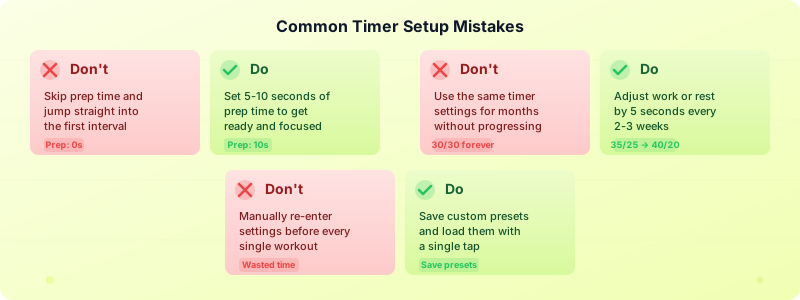
Jumping straight into your first work interval without a countdown catches you off-guard. You waste the first 3-5 seconds getting into position instead of working. Always set at least 5 seconds of prep time.
Rest Periods Too Long for Your Goal
If your goal is cardiovascular conditioning, resting 60 seconds between 20-second work intervals defeats the purpose. Your heart rate drops too far, and you lose the metabolic benefit of short rest. Match your rest period to your training goal using the ratios above.
Never Changing Your Settings
Running the same 30/30 timer for months creates a plateau. Your body adapts, and the stimulus stops producing results. Increase your work intervals by 5 seconds, reduce rest by 5 seconds, or add 2 more rounds every 2-3 weeks to keep progressing.
Recreating Timers From Scratch Every Session
If you manually enter the same settings before every workout, you are wasting time and increasing the chance of input errors. Save your favorite configurations as presets. In Interval Timer, you can save unlimited custom timers and load them with a single tap.
Ignoring Audio Cues
Training with your timer on silent means you have to watch the screen constantly. That breaks your focus and limits your movement. Turn on audio alerts or use vibration on your Apple Watch so you can train eyes-free and fully commit to each interval.
Start Timing Your Workouts Today
Learning how to set up an interval timer takes five minutes. The payoff lasts for every workout you do from this point forward. Start with a simple configuration — pick a workout type, set your rounds, dial in your work and rest intervals, and press start.
No more guessing when to stop. No more resting too long. Just structured, focused training that drives results.
Download Interval Timer and set up your first custom timer in under 30 seconds. Every workout type — HIIT, Tabata, EMOM, AMRAP, boxing, and more — is ready to go.