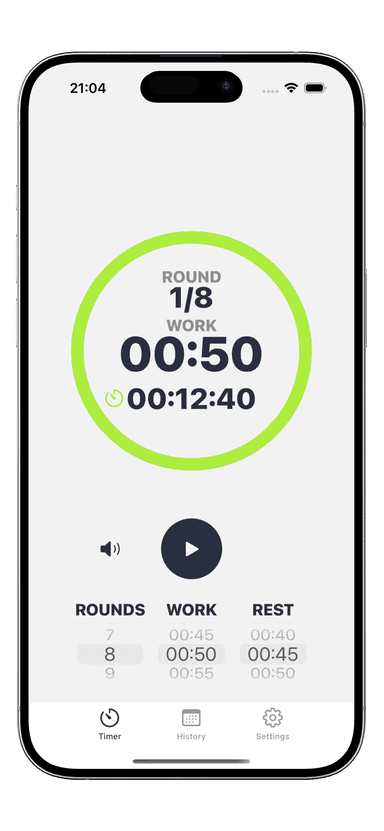
Couch to 5K Interval Timer Settings: Week by Week
You downloaded a Couch to 5K plan. You know the idea: start with short run/walk intervals, build up over nine weeks, and eventually run 5K without stopping. But when you open your timer app, you stare at empty fields. What exactly do you enter? These couch to 5k interval timer settings break down every week so you can program your timer and just follow the beeps.
What Is the Couch to 5K Program?
Couch to 5K (C25K) is a nine-week run/walk program created by Josh Clark in 1996. It takes complete beginners from zero running to a continuous 30-minute jog — roughly enough to cover 5 kilometers.
The structure is simple. You train three days per week. Each session uses timed intervals of running and walking, and the running portions get longer each week while the walking portions shrink. Every session starts with a 5-minute brisk warm-up walk and ends with a 5-minute cool-down walk.
What makes C25K different from just "going for a jog" is the precise timing. You need a reliable timer that tells you exactly when to run and when to walk. That is where your interval timer setup becomes essential.
Complete C25K Timer Settings by Week
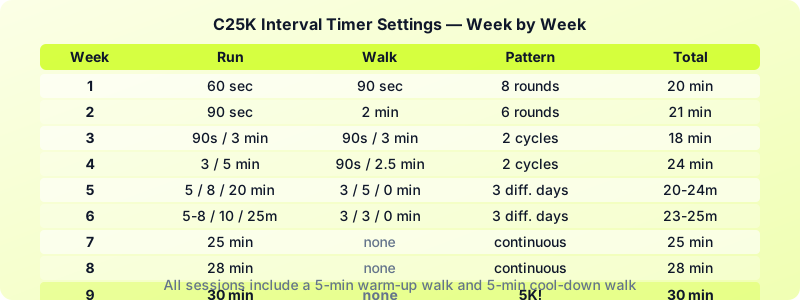
Here are the exact couch to 5k interval timer settings for the classic nine-week program. Each session excludes the 5-minute warm-up and 5-minute cool-down walks.
Week 1: Run 60 seconds, walk 90 seconds. Repeat 8 times. Total active time: 20 minutes.
Week 2: Run 90 seconds, walk 2 minutes. Repeat 6 times. Total active time: 21 minutes.
Week 3: Run 90 seconds, walk 90 seconds, run 3 minutes, walk 3 minutes. Repeat 2 times. Total active time: 18 minutes.
Week 4: Run 3 minutes, walk 90 seconds, run 5 minutes, walk 2.5 minutes. Repeat 2 times. Total active time: 24 minutes.
Week 5 (Day 1): Run 5 minutes, walk 3 minutes. Repeat 3 times. Total active time: 24 minutes.
Week 5 (Day 2): Run 8 minutes, walk 5 minutes, run 8 minutes. Total active time: 21 minutes.
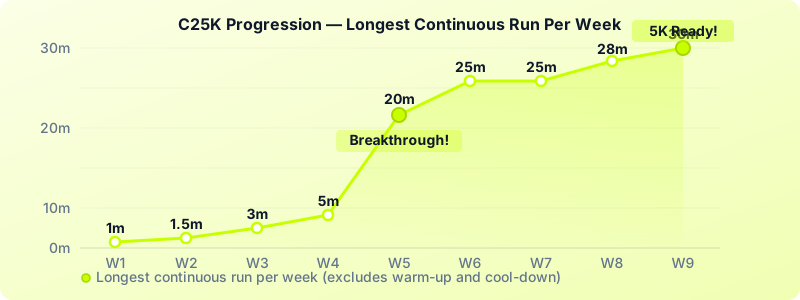
Week 5 (Day 3): Run 20 minutes straight. No walking intervals.
Week 6 (Day 1): Run 5 minutes, walk 3 minutes, run 8 minutes, walk 3 minutes, run 5 minutes. Total active time: 24 minutes.
Week 6 (Day 2): Run 10 minutes, walk 3 minutes, run 10 minutes. Total active time: 23 minutes.
Week 6 (Day 3): Run 25 minutes straight.
Week 7: Run 25 minutes straight. All three sessions.
Week 8: Run 28 minutes straight. All three sessions.
Week 9: Run 30 minutes straight. You just ran a 5K.
How to Set Up Your Timer for Each Phase
The C25K program has three distinct phases, and each one needs a different timer setup. Here is how to configure your run walk timer settings for each.
Phase 1: Simple Repeating Intervals (Weeks 1-2)
Weeks 1 and 2 use a single run/walk pattern that repeats. This is the easiest C25K timer setup.
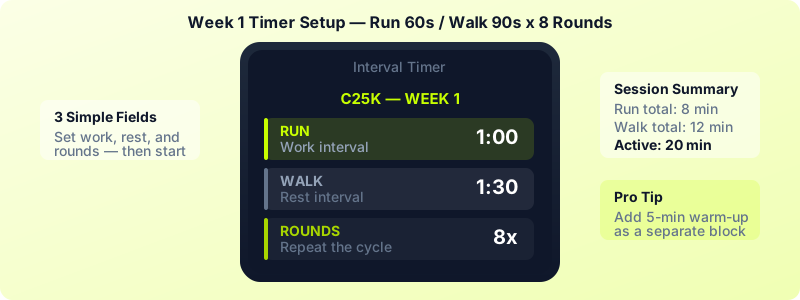
Open your interval timer app and create a new custom timer. Set the work interval to your run duration (60 seconds for Week 1, 90 seconds for Week 2). Set the rest interval to your walk duration (90 seconds for Week 1, 2 minutes for Week 2). Set the number of rounds to 8 for Week 1 or 6 for Week 2. Hit start and follow the alerts.
Phase 2: Mixed Intervals (Weeks 3-6)
This is where things get interesting. Weeks 3 through 6 use different interval lengths within the same session. For example, Week 3 alternates between 90-second jogs and 3-minute jogs.
You have two options. First, you can use a couch to 5k timer app with custom interval sequences. In Interval Timer, you can build a workout with multiple interval blocks — set a 90-second run, a 90-second walk, a 3-minute run, and a 3-minute walk, then repeat the whole sequence twice.
Second, if your timer only supports uniform intervals, you can break each session into two mini-workouts and run them back to back.
Phase 3: Continuous Runs (Weeks 7-9)
By Week 7, you no longer need run/walk intervals. Set a simple countdown timer for 25, 28, or 30 minutes. A basic stopwatch works too, but a countdown timer gives you a clear finish line to run toward.
If you are already using Interval Timer for the earlier weeks, you can simply set one work interval for the full duration and one round. Your workout history gets tracked automatically, so you can see your progression from Week 1 all the way through.
Tips for Completing the Program Successfully
Thousands of people start C25K every month. Here is what separates those who finish from those who drop off by Week 4.
-
Repeat weeks when needed. If Week 3 felt brutal, do it again. The program is a guide, not a contract. There is no penalty for taking 12 weeks instead of 9.
-
Run slower than you think you should. The biggest beginner mistake is sprinting during the run intervals. You should be able to hold a choppy conversation while jogging. If you are gasping, slow down.
-
Never skip the warm-up walk. Those 5 minutes of brisk walking raise your heart rate gradually and warm up your joints. Program them into your timer as a separate block before your intervals start.
-
Run three days per week, not more. Rest days are when your body adapts. Running every day as a beginner leads to shin splints, sore knees, and quitting.
-
Track every session. Seeing a streak of completed workouts builds momentum. Use your timer's history feature or a simple calendar. The visual proof that you showed up 15 times in five weeks is powerful motivation.
If you are new to running interval training, the C25K program is one of the most battle-tested starting points. It works because it respects your body's need for gradual progression.
From 5K to Faster — What Comes Next
You finished Week 9. You can run 30 minutes without stopping. Now what?
First, celebrate. You did something most people only talk about. Then pick your next goal.
Option 1: Get faster at 5K. Add one speed interval session per week. Run 400 meters hard, walk 200 meters to recover, repeat 4-6 times. Use the same interval timer you trained with — just update the work and rest durations.
Option 2: Run longer. Apply the same 10% rule C25K uses. Add 3 minutes to your long run each week. Go from 30 minutes to 33, then 36, then 40. Within two months, you will be in 10K territory.
Option 3: Mix in other training. Add a day of bodyweight circuits or HIIT between your running days. The interval timer you used for C25K works for any timed workout — Tabata, EMOM, or custom circuits.
Whatever direction you choose, keep using a timer. The structure that got you from the couch to 5K is the same structure that will carry you further.
Download Interval Timer and load your first C25K week today. Your couch to 5k interval timer settings are ready — all you have to do is lace up and press start.