How to Track Calories Burned During a HIIT Workout
Tracking calories burned during HIIT is more complicated than tracking a steady jog, because HIIT creates large swings in intensity that most measurement tools struggle to capture accurately. The good news: you don't need precise numbers to use calorie data effectively for fat loss. You need consistent estimates and an understanding of what they're measuring.
Here's how calorie tracking works during HIIT, what tools give the most useful data, and how to apply the numbers practically.
Why HIIT Calorie Measurement Is Harder Than Steady Cardio
Calorie burn during exercise is calculated using oxygen consumption (VO2). At a steady pace — running at 8km/h for 30 minutes — oxygen consumption is relatively stable and predictable from heart rate and known metabolic equivalents (METs).
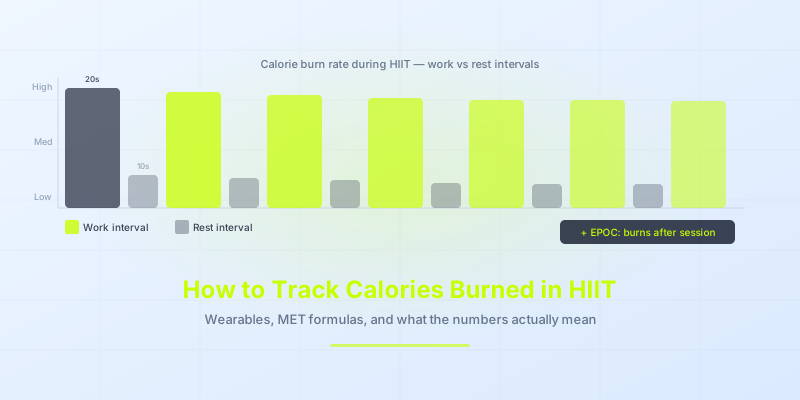
During HIIT, intensity shifts dramatically every 20–40 seconds. Heart rate lags behind actual effort — it takes 15–30 seconds for your heart rate to respond to a change in intensity. This means during a 20-second maximum effort interval, your heart rate is still climbing when the rest period begins.
Wearables that estimate calories from heart rate therefore undercount effort during work intervals (heart rate hasn't caught up) and overcount during rest (heart rate is still elevated from the previous interval). The total is roughly in the right range, but the moment-to-moment tracking is imprecise.
EPOC adds uncounted burn: HIIT produces significant excess post-exercise oxygen consumption — elevated metabolism for hours after the session. Most trackers don't account for EPOC at all, which means the post-session calorie burn from HIIT (which can be 6–15% of the in-session burn) goes untracked.
Methods for Tracking HIIT Calorie Burn
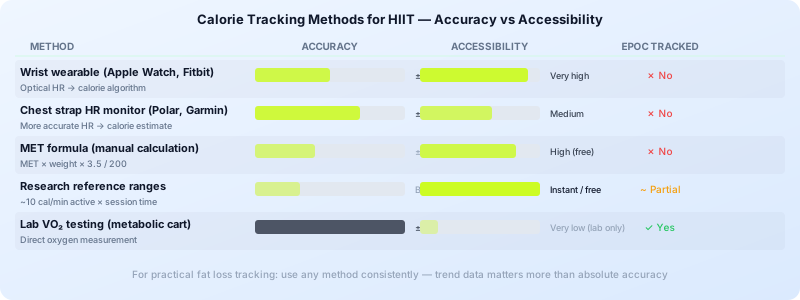
1. Wearable Heart Rate Monitors (Apple Watch, Garmin, Polar)
Optical heart rate monitors on wrists are the most common tracking method. For HIIT specifically:
- Apple Watch: Uses a combination of heart rate, motion, and personal data (age, weight, height, sex) to estimate active calories. Tends to read 10–30% high compared to lab measurements for HIIT.
- Garmin and Polar chest straps: Chest strap HR monitors are more accurate than optical wrist sensors because they respond faster to heart rate changes. Still imprecise for HIIT but better than wrist-based optical.
- Accuracy range: Most wearables are within ±20% for steady cardio; for HIIT, variance can be ±30% or more.
2. MET-Based Calculations
Metabolic equivalents (METs) assign an intensity value to activities. HIIT is typically rated at 8–14 METs depending on exercise choice and effort level.
Formula: Calories per minute = MET × body weight (kg) × 3.5 / 200
For a 75kg person doing HIIT at 10 METs for 20 minutes: 10 × 75 × 3.5 / 200 = 13.1 calories per minute × 20 minutes = 262 calories
This is a rough estimate that doesn't account for individual fitness level or actual intensity. Fitter people burn fewer calories doing the same HIIT because their bodies are more efficient.
3. Lab-Based Testing (VO2 Testing)
VO2 max testing in a sports science lab measures actual oxygen consumption with a metabolic cart and face mask. This is the most accurate method but inaccessible for most people. Some university sports science facilities offer testing for a fee.
4. Perceived Exertion + Reference Data
For practical purposes, combining perceived exertion (RPE on a 1–10 scale) with reference calorie data from research studies is often as useful as wearable estimates. Research consistently shows bodyweight HIIT burns 8–14 calories per minute during active intervals — using 10 cal/min as a reference and multiplying by active time gives a usable ballpark.
How Many Calories Does HIIT Actually Burn?
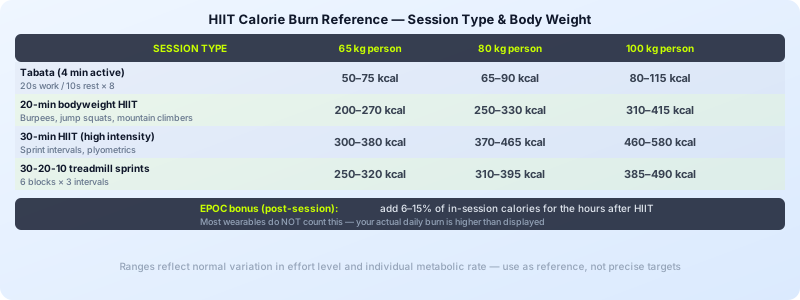
Reference ranges from research:
- 20-minute bodyweight HIIT session: 200–350 calories
- 30-minute HIIT with higher-intensity movements (burpees, jump squats): 300–450 calories
- Tabata (4 minutes active, 20s/10s): 50–100 calories during the session plus 50–150 calories EPOC over the following hours
These ranges vary significantly with body weight, fitness level, and actual effort. A 100kg person burns roughly 40–50% more than a 65kg person doing the same session.
For Tabata workouts and other high-intensity formats, the post-exercise burn is a meaningful portion of total energy expenditure — accounting for it is important for accurate tracking.
Practical Approach: Consistent Tracking Over Precise Tracking
The goal of calorie tracking for fat loss isn't perfect accuracy — it's useful trend data. If your Apple Watch consistently estimates 280 calories for your HIIT session, that number is useful even if the true burn was 220 or 340 calories — because next week's same session will also show ~280, and the trend tells you something real about your training volume.
What matters: Are you creating a calorie deficit over the week? Is your training volume (as measured by your tracker) trending up or down? Are your sessions getting easier at the same tracked calorie output (a sign of fitness improvement)?
Use your tracker as a relative measure, not an absolute one.
Setting Up Your HIIT Session to Track Accurately
Whatever tracking method you use, these steps improve the quality of the data:
- Wear your device correctly: Fitness band snug on the wrist, one finger above the wrist bone. Loose bands produce noisy optical HR readings.
- Log workout type correctly: Most wearables have a specific HIIT or High Intensity Interval Training mode that adjusts the calorie algorithm.
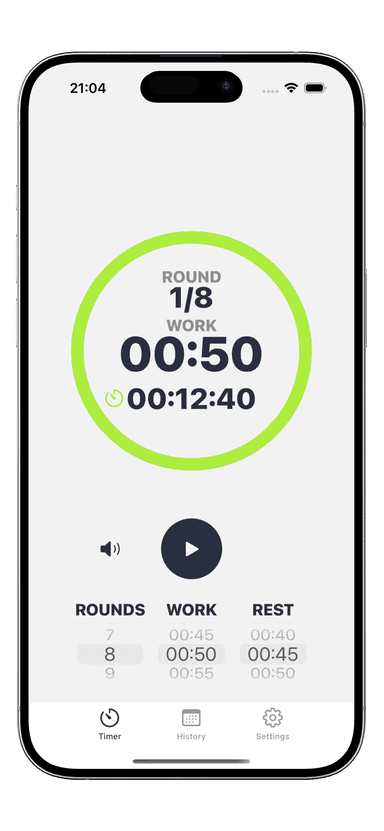
- Use an interval timer: Knowing exactly how long you worked versus rested lets you apply MET calculations accurately. The Interval Timer app logs your session duration and interval breakdown — useful reference data for manual calculation.
- Note your RPE: A simple 1–10 rating after each session gives context for whether the tracker's calorie estimate seems plausible.
For HIIT workouts at home without a treadmill or machine (which have their own calorie counters), wearable + perceived exertion is your primary tracking combo.
Calorie Tracking vs. Performance Tracking
For fat loss, calorie tracking is one input. Performance tracking — are you completing more rounds, working harder in each interval, recovering faster — is often a better indicator of progress.
A how to increase VO2 max approach focuses on aerobic capacity improvements, which correlate with long-term fat loss better than any single session calorie count. Getting fitter means your body handles more total work over time, which accumulates into a larger calorie deficit than trying to maximize burn in any individual session.
Track calories as a useful reference. Track performance metrics as the real measure of progress.
Download Interval Timer to structure your HIIT sessions with precise work/rest intervals — consistent session structure makes your calorie tracking more comparable week to week.