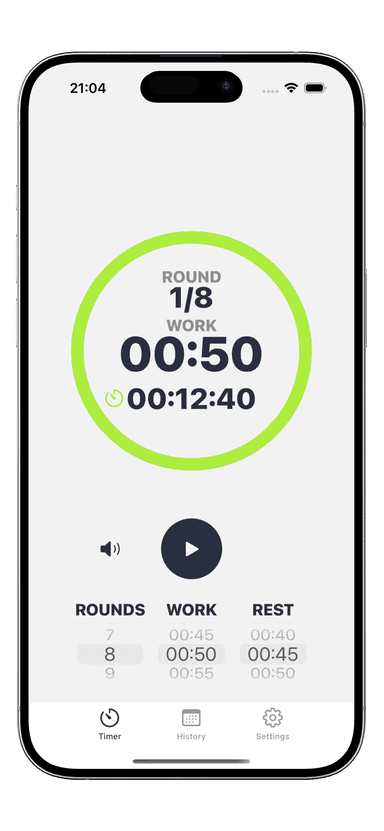
How to Use an Interval Timer for Running
You already know that interval running builds speed and endurance faster than jogging at the same pace for 30 minutes straight. But most runners still guess their intervals, glancing at a clock or counting steps in their head. Knowing how to use an interval timer for running changes everything. It removes the guesswork, keeps your effort honest, and lets you focus on the one thing that matters: putting one foot in front of the other.
Whether you are training for a 5K, recovering from an injury with a run walk timer, or chasing a new personal best, a well-configured timer turns every session into structured, repeatable progress. Here is exactly how to set yours up and get running.
Why Every Runner Needs an Interval Timer
Running without a timer is like lifting weights without tracking reps. You might feel productive, but you have no way to measure improvement or stay consistent session to session.
An interval timer running setup solves three problems at once:
- Pacing discipline — Beginners tend to start too fast and crash halfway through. A timer forces you to respect your recovery windows and keep your run segments consistent.
- Progressive overload — You can increase your run intervals by 10-15 seconds per week and see the improvement in black and white. Without a timer, you are guessing whether this week was actually harder than last week.
- Mental relief — Counting seconds in your head while running is mentally exhausting. When your timer handles the clock, your brain can focus on form, breathing, and the road ahead.
Research backs this up. Structured interval programs with timed segments produce up to 19% greater improvements in VO2max compared to unstructured training over 8 weeks. The timer is not optional if you want real results.
If you are new to intervals entirely, check out our guide on running interval training for beginners to understand the fundamentals before diving into timer setup.
Setting Up Run/Walk Intervals Step by Step
Getting your interval timer configured takes about 60 seconds. Here is the process from start to finish.
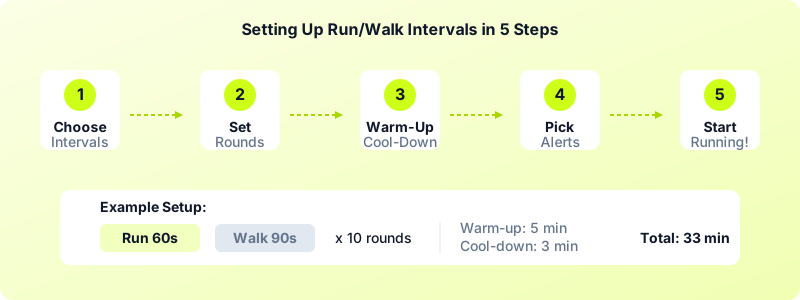
Step 1: Choose your intervals. Decide on your run and walk durations. If you are just starting out, try 60 seconds running and 90 seconds walking. If you have some base fitness, go with 3 minutes running and 1 minute walking.
Step 2: Set the number of rounds. Divide your target workout time by the total interval length. For a 24-minute session with 60-second run / 90-second walk intervals, that is 24 divided by 2.5, which equals about 10 rounds.
Step 3: Add warm-up and cool-down. Program a 5-minute warm-up walk before your first interval and a 3-minute cool-down walk after your last one. This protects your joints and helps your heart rate transition smoothly.
Step 4: Pick your alerts. Set distinct sounds or vibration patterns for run and walk phases. Vibration alerts work best for outdoor running because you feel them through your wrist even with headphones in and traffic noise around you.
Step 5: Start and run. Hit go, slip your phone into an armband or pocket, and let the timer guide your session. No more clock-watching.
With Interval Timer, you can save this entire configuration as a custom workout and load it in one tap next time. That means zero setup on run day — just open the app and go.
Best Timer Settings for Different Running Goals
The beauty of interval running is that the same timer tool works for wildly different goals. You just change the numbers. Here are proven settings for the five most common running objectives.
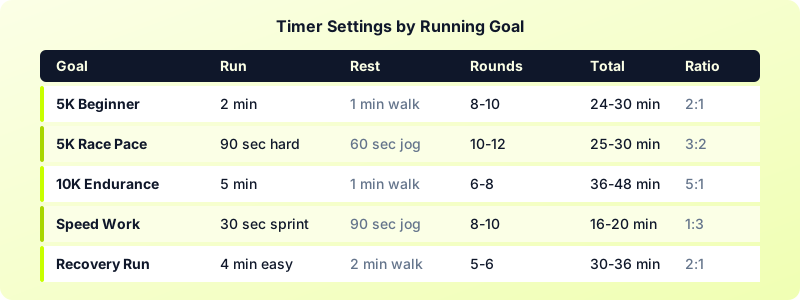
5K Training (Beginner)
- Run: 2 minutes | Walk: 1 minute
- Rounds: 8-10
- Total time: 24-30 minutes
- Use this if you can jog for 2 minutes without stopping but cannot yet run a full 5K continuously. Gradually extend your run segments by 15 seconds each week.
5K Training (Race Pace)
- Hard run: 90 seconds | Easy jog: 60 seconds
- Rounds: 10-12
- Total time: 25-30 minutes
- Run your hard segments at your target 5K pace. The easy jog keeps you moving without full rest, simulating race conditions.
10K Endurance
- Run: 5 minutes | Walk: 1 minute
- Rounds: 6-8
- Total time: 36-48 minutes
- Longer run intervals build the sustained aerobic capacity you need for a 10K. Walk breaks keep fatigue from snowballing in the final miles.
Speed Development
- Sprint: 30 seconds | Recovery jog: 90 seconds
- Rounds: 8-10
- Total time: 16-20 minutes (plus warm-up)
- Short, hard efforts develop your top-end speed and running economy. Keep your sprints at 85-90% of maximum effort.
Recovery Run
- Easy jog: 4 minutes | Walk: 2 minutes
- Rounds: 5-6
- Total time: 30-36 minutes
- Use this the day after a hard session. The walk breaks prevent you from pushing too hard when your body needs easy mileage.
For a detailed week-by-week timer progression from couch to race day, see our Couch to 5K interval timer settings guide.
Advanced Running Timer Techniques
Once basic run/walk intervals feel comfortable, these three techniques add variety and push your fitness to the next level.
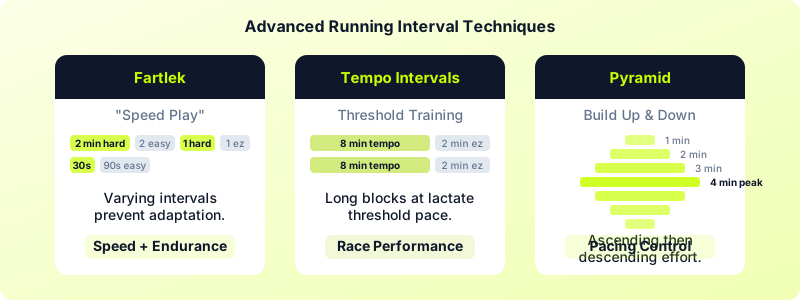
Fartlek Intervals
Fartlek is Swedish for "speed play," and it is one of the most effective ways to build both speed and endurance in a single session. Set your timer for alternating segments of varying length:
- 2 minutes hard, 2 minutes easy
- 1 minute hard, 1 minute easy
- 30 seconds hard, 90 seconds easy
- Repeat the sequence 2-3 times
The changing durations prevent your body from settling into a rhythm, which forces greater cardiovascular adaptation. Program each segment as a separate interval in your running timer app so transitions are automatic.
Tempo Intervals
Tempo intervals train your lactate threshold — the pace you can sustain for about an hour. Instead of one long tempo run, break it into timed blocks:
- 8 minutes at tempo pace / 2 minutes easy jog
- Repeat 3 times
- Total tempo work: 24 minutes
This approach lets you accumulate more time at threshold pace than a single continuous effort because the short recoveries delay fatigue.
Pyramid Intervals
Pyramid workouts build up to a peak effort and then bring you back down. Program your timer with this sequence:
- 1 minute hard, 1 minute easy
- 2 minutes hard, 1 minute easy
- 3 minutes hard, 1 minute easy
- 4 minutes hard, 1 minute easy
- 3 minutes hard, 1 minute easy
- 2 minutes hard, 1 minute easy
- 1 minute hard, 1 minute easy
Total workout: 23 minutes. The ascending and descending structure teaches you to manage effort across different durations, which translates directly to better race pacing.
Picking the Right Interval Timer App for Running
Not every timer app works well for running. Here is what to look for when choosing a running timer app:
- Custom intervals — You need the ability to set different durations for run and walk phases, not just a single repeating timer. Fartlek and pyramid workouts require multiple distinct interval lengths within one session.
- Vibration and audio alerts — Sound alone does not cut it outdoors. Look for apps with strong haptic feedback that you can feel through your wrist or pocket mid-stride.
- Save and reload workouts — You should not have to reprogram your timer before every run. Save your configurations and load them instantly.
- Apple Watch or wearable support — Leaving your phone behind makes running simpler. A wrist-based timer with haptic cues lets you run without carrying anything extra.
- Workout history — Tracking which interval configurations you used and when helps you see progression over time.
Interval Timer checks every one of these boxes. You can create custom run/walk intervals, save them as presets, get vibration alerts on Apple Watch, and review your workout history to track your running progression over weeks and months. It works offline, requires no account, and keeps all your data on your device.
Your interval timer is the simplest piece of running gear you will ever use — and one of the most impactful. Set it up once, save your configuration, and let it handle the clock while you handle the miles.
Download Interval Timer and set up your first running interval workout today.