Interval Training Timer With Voice Alerts: Full Guide
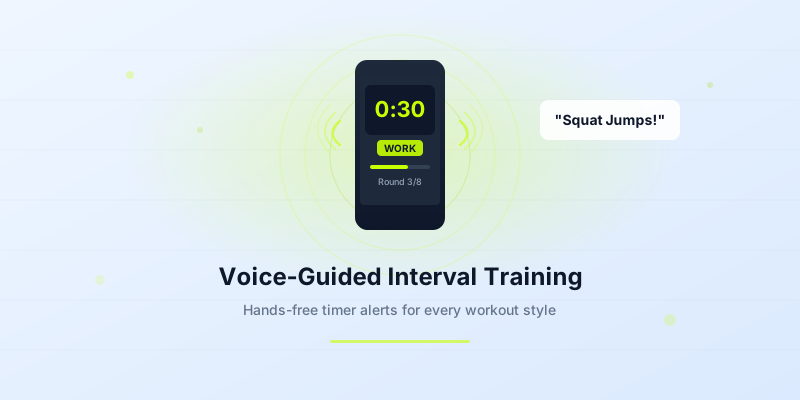
Staring at your phone screen mid-burpee is a fast track to a face-plant. An interval training timer with voice alerts solves that problem by telling you exactly when to work and when to rest — out loud, so your eyes stay on the floor (or the ceiling, depending on the exercise).
Voice-guided timers have become the go-to tool for HIIT, Tabata, boxing, and circuit sessions. In this guide you will learn why voice alerts outperform simple beeps, how to configure them for different workout styles, and how to set up your interval timer so every round runs on autopilot.
Why Voice Alerts Make Interval Training Better
Traditional buzzer-only timers give you one piece of information: the interval changed. A voice alert gives you context. It can announce "Work — 30 seconds," count down the final three seconds, and call out "Rest" before you even glance at a screen.
That hands-free feedback loop matters more than most people realize. A 2024 study in the Journal of Sports Sciences found that athletes who received auditory pacing cues maintained target heart-rate zones 18% more consistently than those relying on visual cues alone.
Here is what voice alerts add to your session:
- Zero screen dependency. Phone stays in your pocket or across the room.
- Faster transitions. You hear "Switch" and move instantly — no lag from reading a display.
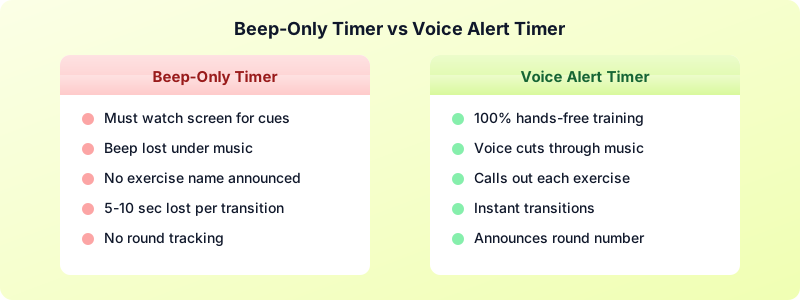
- Fewer missed intervals. Background music can drown out a short beep. A spoken cue cuts through.
- Mental focus. You stay in the movement instead of counting seconds in your head.
If you are just starting out, pair voice alerts with a beginner HIIT workout to get comfortable with the pacing before you push intensity.
How Voice Alerts Work During a Workout
Most interval timer apps with voice cues use text-to-speech or pre-recorded clips that fire at specific trigger points. Here is a typical sequence during one round of a 30-second-work / 15-second-rest HIIT block:
- Round start: "Round 3 — Squat Jumps — 30 seconds."
- Halfway mark (optional): "Fifteen seconds left."
- Countdown: "Three… two… one…"
- Transition: "Rest — 15 seconds."
- Upcoming cue: "Next exercise: Push-ups."
The best apps let you choose which trigger points speak and which stay silent. Some people want a minimal setup — just "Work" and "Rest." Others want every countdown tick. The key is matching the level of feedback to your workout intensity.
For fast Tabata rounds (20 seconds on, 10 seconds off), a full countdown every round can feel cluttered. A simple "Go" and "Rest" is enough. For longer 60-second EMOM intervals, a halfway reminder helps you manage your pace.
Best Timer Settings With Voice Alerts by Workout Type
Different training styles need different voice configurations. Here are proven settings for the four most popular interval formats:
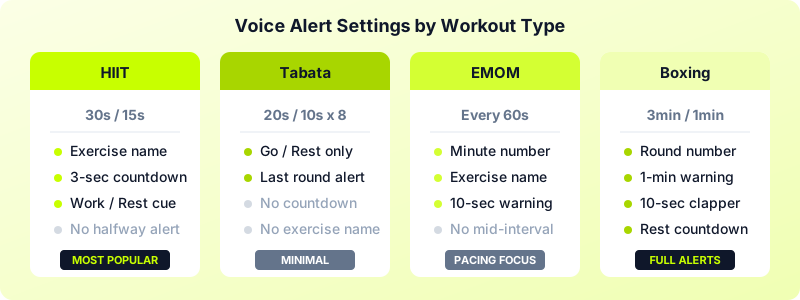
HIIT (30s work / 15s rest)
- Voice at round start with exercise name
- 3-second countdown before transitions
- No halfway alert (intervals are short enough)
Tabata (20s work / 10s rest × 8 rounds)
- "Go" and "Rest" only — minimal voice
- Final round announcement: "Last round"
- Total time: 4 minutes
EMOM (every 60 seconds)
- Voice at the start of each minute: "Minute 5 — 10 Thrusters"
- 10-second warning: "Ten seconds to finish"
- No mid-interval alerts
Boxing Rounds (3 min work / 1 min rest)
- Round number at start: "Round 4"
- One-minute warning: "One minute left"
- 10-second clapper countdown
- "Rest" and "Thirty seconds of rest left"
Adjust these templates to your experience level. Beginners benefit from more frequent cues. Advanced athletes often prefer fewer interruptions.
Voice Alerts vs Beeps: Which Keeps You on Track?
Beeps are fine when you are doing a simple timer with one interval type. The moment you add multiple exercises, varying rest periods, or round-specific pacing, beeps fall short.
Here is a practical comparison:
| Feature | Beep-Only Timer | Timer With Voice Alerts |
|---|---|---|
| Knows which exercise is next | No | Yes |
| Works with earbuds during music | Barely audible | Speaks over music |
| Tracks round number for you | No | Yes |
| Useful for complex circuits | Limited | Excellent |
| Learning curve | None | Minimal (one-time setup) |
Voice alerts shine in circuit training where you rotate through 6-8 exercises. Instead of memorizing the order or taping a list to the wall, the timer announces each movement. That alone can save 5-10 seconds of dead time per transition across a 20-minute session.
The one scenario where beeps win: very short, simple intervals where any audio feels intrusive — like a quiet yoga flow with 30-second hold timers.
How to Set Up Voice Alerts in Interval Timer
The Interval Timer app makes voice alert setup straightforward. Here is how to get started:
- Open the app and create a new custom timer.
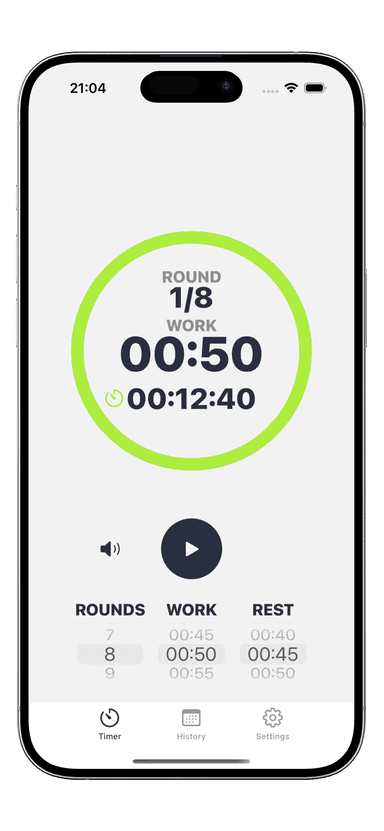
- Set your intervals — work duration, rest duration, and number of rounds.
- Enable voice alerts in the sound settings. Choose between text-to-speech or tone-based alerts.
- Pick your trigger points — round start, countdown, halfway, transition, or all of them.
- Name your exercises (optional). If you add exercise names, the voice will call them out at each round start.
- Test with one round before starting the full workout to make sure the volume and pacing feel right.
For a detailed walkthrough on building custom timers, check the interval timer setup guide.
Pro tips for voice alerts:
- Keep your phone volume at 70-80% so alerts cut through music without blasting.
- Use short exercise names — "Burpees" works better than "Burpee with Push-up and Tuck Jump."
- If you train with Apple Watch, voice alerts on your wrist plus haptic taps make a powerful combo that needs zero screen time.
- Save your configured timer as a preset so you can launch it in one tap next session.
Voice-guided interval training turns your timer from a passive countdown into an active coach. You spend less energy tracking time and more energy on the movements that matter.
Download Interval Timer and set up your first voice-guided workout in under a minute.